Guide · July 4, 2026
The AI data readiness checklist: 12 checks you can run today.
By the MortarIQ Founder · 6 minute read
Most AI data readiness checklists are vibes. “Ensure high data quality.” “Establish strong governance.” You cannot check either of those boxes, because neither is a check; they are aspirations wearing a checkbox costume. Then the project starts, the retrieval pipeline reads a column called status2_old, and everyone rediscovers why the aspirations mattered.
This checklist is different in one specific way: every item on it is verifiable from warehouse metadata. Not from interviews, not from a data quality tool that needs three weeks and read access to your rows. Schema, descriptions, timestamps, tags, policies. If you can query your catalog, you can answer all twelve today, and if you would rather not do it by hand, the automation section at the end takes minutes.
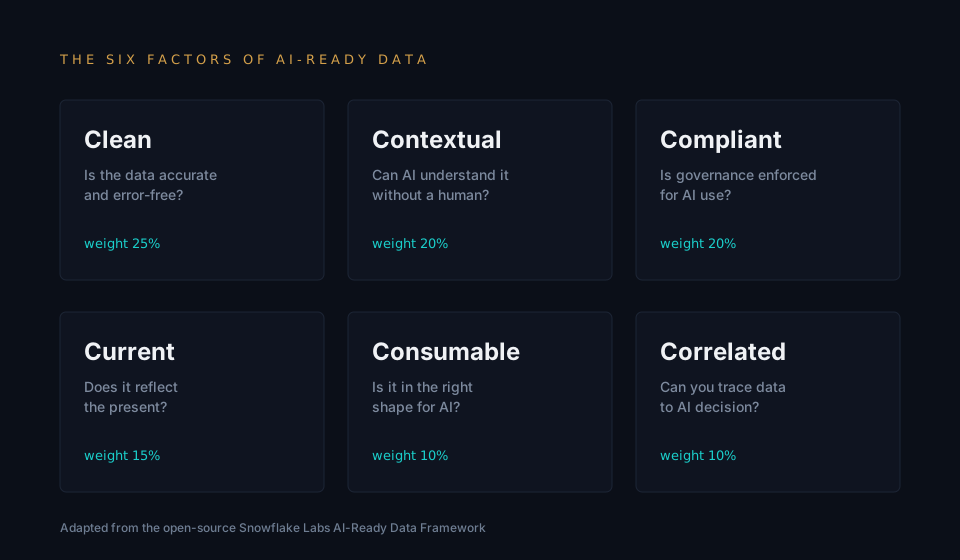
The twelve checks are grouped by the six factors MortarIQ scores, adapted from the open-source Snowflake Labs framework. The grouping matters less than the habit: check what is checkable, before you build.
The checklist at a glance
Twelve checks, grouped by the factor each one serves. Copy this into your own doc and work down it; the detail behind every line follows below, and the SQL to answer four of them is further down still.
| # | Check | Pass when |
|---|---|---|
| 1 | The tables your workload touches have descriptions | Every table in the target schemas has a non-empty description. Measure coverage on those schemas, not the estate average. |
| 2 | Columns with ambiguous names are documented | No column whose name needs explaining is left without one. Enumerated and boolean-ish columns list their valid values. |
| 3 | Every source table has refreshed within its expected window | Each table's last-modified timestamp is inside its declared refresh interval, with no unexplained outliers. |
| 4 | Freshness expectations are written down somewhere queryable | Each source table declares an expected refresh cadence in a tag, label, or description — so check 3 can run automatically. |
| 5 | Columns that look like personal data carry a classification tag | Every PII-candidate column (name, email, phone, address, national identifier) is classified. Zero untagged candidates. |
| 6 | Tagged personal data is covered by a masking policy | Every classified column has a masking or access policy attached, and the role your workload runs as is subject to it. |
| 7 | Keys are declared on the tables that matter | Every table the workload joins or deduplicates on declares a primary key or unique constraint, even where the platform does not enforce it. |
| 8 | Types are honest | No dates stored as strings, no numerics stored as text, no JSON blob holding fields the workload filters on. |
| 9 | Relationships between core entities are declared | Every join the workload depends on is a declared foreign key or a documented join path — not an inference from column names. |
| 10 | One entity, one authoritative table | For each core entity there is one table marked canonical, and the alternates say what they are for. |
| 11 | Big tables are partitioned or clustered for their access pattern | Every large table the workload reads is partitioned or clustered on the column it is actually filtered by. |
| 12 | Naming follows one convention | One casing convention and one prefix scheme across the target schemas, with exceptions documented rather than tolerated. |
Contextual: can a machine understand it?
1. The tables your workload touches have descriptions
Not the whole estate. The tables this AI project will actually read. A model, an agent, or the engineer wiring up retrieval has no tribal knowledge; the description field is the only voice your table has. Check coverage on the target schemas, not the average.
Pass when: Every table in the target schemas has a non-empty description. Measure coverage on those schemas, not the estate average.
2. Columns with ambiguous names are documented
status, type, flag, amount, value. If a human needs to ask what a column means, an AI will guess, and it will guess confidently. Every column whose name does not fully explain itself needs a description.
Pass when: No column whose name needs explaining is left without one. Enumerated and boolean-ish columns list their valid values.
Current: is it fresh enough to act on?
3. Every source table has refreshed within its expected window
Compare the last-modified timestamp against how often the table is supposed to load. A table that should refresh nightly and last changed eleven days ago is a silent failure that will feed your workload stale answers.
Pass when: Each table's last-modified timestamp is inside its declared refresh interval, with no unexplained outliers.
4. Freshness expectations are written down somewhere queryable
If nobody declared how fresh a table should be, staleness is undetectable by definition. A tag, a label, or even a convention in the description is enough to make check 3 automatic.
Pass when: Each source table declares an expected refresh cadence in a tag, label, or description — so check 3 can run automatically.
Compliant: can it be used without creating exposure?
5. Columns that look like personal data carry a classification tag
Names, emails, phone numbers, addresses, national identifiers. The candidates are visible from column names and types alone. Untagged PII is not a paperwork gap; it is the input an AI pipeline will happily read and repeat.
Pass when: Every PII-candidate column (name, email, phone, address, national identifier) is classified. Zero untagged candidates.
6. Tagged personal data is covered by a masking policy
A tag without a policy is a label on an open door. Check that the masking or dynamic-data-policy actually attaches to the sensitive columns, because the AI workload reads whatever the role it runs as can see.
Pass when: Every classified column has a masking or access policy attached, and the role your workload runs as is subject to it.
Clean: is the structure trustworthy?
7. Keys are declared on the tables that matter
Primary keys, unique constraints, or their warehouse-native equivalents. Even where the platform does not enforce them, the declaration tells every consumer, human or machine, what a row means.
Pass when: Every table the workload joins or deduplicates on declares a primary key or unique constraint, even where the platform does not enforce it.
8. Types are honest
Dates stored as strings, numerics stored as text, JSON blobs holding what should be columns. Every dishonest type is a parsing decision an AI system will make for you, silently.
Pass when: No dates stored as strings, no numerics stored as text, no JSON blob holding fields the workload filters on.
Correlated: do the joins survive contact?
9. Relationships between core entities are declared
Foreign keys or documented join paths between the tables your workload must combine. An undeclared relationship is a join condition someone will infer from column names, and column names lie.
Pass when: Every join the workload depends on is a declared foreign key or a documented join path — not an inference from column names.
10. One entity, one authoritative table
If there are four customer tables, which one does retrieval read? Duplicated entities force every consumer to relitigate which copy is canonical, and an AI consumer will just pick one.
Pass when: For each core entity there is one table marked canonical, and the alternates say what they are for.
Consumable: can a workload actually read it efficiently?
11. Big tables are partitioned or clustered for their access pattern
A workload that scans a two-terabyte table end to end for every question is a cost problem first and a latency problem second. Partitioning metadata is visible without touching a row.
Pass when: Every large table the workload reads is partitioned or clustered on the column it is actually filtered by.
12. Naming follows one convention
snake_case here, camelCase there, dim_ prefixes on half the star schema. Inconsistency is friction for people and a hallucination surface for machines that autocomplete table names.
Pass when: One casing convention and one prefix scheme across the target schemas, with exceptions documented rather than tolerated.
Run four of them yourself, right now
The checks above are only useful if you can actually answer them, so here is the SQL for the four that carry the most weight. These are simplified from the queries our own connectors run — the full published set lives at /security/queries. Every one reads catalog metadata only; none of them touch a row of your data.
Check 1 — documentation coverage
What fraction of your columns carry a description? This is the number that most often decides whether a corpus is interpretable, and it is almost always lower than people expect.
-- Snowflake
SELECT COUNT(*) AS total_columns,
       COUNT(NULLIF(TRIM(COALESCE(comment, '')), '')) AS documented_columns,
       ROUND(100 * COUNT(NULLIF(TRIM(COALESCE(comment, '')), '')) / NULLIF(COUNT(*), 0), 1) AS pct
FROM   <db>.INFORMATION_SCHEMA.COLUMNS
WHERE  table_schema = '<schema>';

-- BigQuery
SELECT COUNT(*) AS total_columns,
       COUNTIF(description IS NOT NULL AND description != '') AS documented_columns,
       ROUND(100 * SAFE_DIVIDE(COUNTIF(description IS NOT NULL AND description != ''), COUNT(*)), 1) AS pct
FROM   `<project>.<dataset>.INFORMATION_SCHEMA.COLUMN_FIELD_PATHS`;

-- PostgreSQL
SELECT COUNT(*) AS total_columns,
       COUNT(d.description) AS documented_columns,
       ROUND(100.0 * COUNT(d.description) / NULLIF(COUNT(*), 0), 1) AS pct
FROM   information_schema.columns c
JOIN   pg_class cl ON cl.relname = c.table_name
JOIN   pg_namespace n ON n.oid = cl.relnamespace AND n.nspname = c.table_schema
LEFT   JOIN pg_description d ON d.objoid = cl.oid AND d.objsubid = c.ordinal_position
WHERE  c.table_schema = '<schema>' AND cl.relkind IN ('r','p');
Check 5 — unclassified PII candidates
Column names alone will not prove a column holds personal data, but they will reliably produce the candidate list you need to review. Treat the output as questions, not findings.
-- Any ANSI-compatible warehouse (Snowflake, Redshift, Postgres)
SELECT table_name, column_name, data_type
FROM   information_schema.columns
WHERE  table_schema = '<schema>'
  AND  (LOWER(column_name) LIKE '%email%'
   OR   LOWER(column_name) LIKE '%phone%'
   OR   LOWER(column_name) LIKE '%ssn%'
   OR   LOWER(column_name) LIKE '%first_name%'
   OR   LOWER(column_name) LIKE '%last_name%'
   OR   LOWER(column_name) LIKE '%address%'
   OR   LOWER(column_name) LIKE '%birth%'
   OR   LOWER(column_name) LIKE '%passport%')
ORDER  BY table_name, column_name;

-- BigQuery: which columns carry a policy tag at all
SELECT COUNT(*) AS total_columns,
       COUNTIF(ARRAY_LENGTH(policy_tags) > 0) AS classified_columns
FROM   `<project>.<dataset>.INFORMATION_SCHEMA.COLUMN_FIELD_PATHS`;
Check 7 and 9 — declared keys and relationships
Which tables declare a primary key, and which declare a foreign key? Warehouses mostly do not enforce these, which is exactly why people stop writing them — and why an AI consumer has nothing to go on when it needs to know what a row means or how two tables join.
-- Snowflake, Redshift, PostgreSQL
WITH base AS (
  SELECT table_name FROM information_schema.tables
  WHERE table_schema = '<schema>' AND table_type = 'BASE TABLE'
),
pk AS (
  SELECT DISTINCT table_name FROM information_schema.table_constraints
  WHERE table_schema = '<schema>' AND constraint_type = 'PRIMARY KEY'
),
fk AS (
  SELECT DISTINCT table_name FROM information_schema.table_constraints
  WHERE table_schema = '<schema>' AND constraint_type = 'FOREIGN KEY'
)
SELECT (SELECT COUNT(*) FROM base) AS total_tables,
       (SELECT COUNT(*) FROM pk JOIN base USING (table_name)) AS tables_with_pk,
       (SELECT COUNT(*) FROM fk JOIN base USING (table_name)) AS tables_with_fk;
Check 3 — staleness
Sort your tables by how long it has been since anything changed. You are not looking for a number here; you are looking for the tables near the top that someone believes are refreshing nightly.
-- Snowflake
SELECT table_name, last_altered,
       DATEDIFF('day', last_altered, CURRENT_TIMESTAMP()) AS days_since_change
FROM   <db>.INFORMATION_SCHEMA.TABLES
WHERE  table_schema = '<schema>' AND table_type = 'BASE TABLE'
ORDER  BY last_altered ASC;

-- BigQuery
SELECT table_id AS table_name,
       TIMESTAMP_MILLIS(last_modified_time) AS last_modified,
       DATE_DIFF(CURRENT_DATE(), DATE(TIMESTAMP_MILLIS(last_modified_time)), DAY) AS days_since_change
FROM   `<project>.<dataset>.__TABLES__`
ORDER  BY last_modified_time ASC;
Four queries, four of the twelve answered, no row data read. The remaining eight follow the same pattern against the same catalogs — which is the entire premise of a metadata-only assessment, and the reason this checklist can be run on a Tuesday afternoon rather than scheduled as a six-week engagement.
How to actually run this
You can work through the twelve by hand. On BigQuery and Snowflake the catalog views make most checks a morning’s work for one engineer per schema, and the platform posts in this series walk through the exact surfaces to query. The failure mode is not difficulty; it is that nobody re-runs the morning’s work in August, and readiness drifts.
MortarIQ automates the list. A read-only, metadata-only connection scores your warehouse against all 50 requirements behind these checks, weighted for the workload you pick: Estate Scan, RAG, Agents, Training, or Feature Serving. The scan never reads a row of your data, which is why the security review that usually stalls this kind of tool tends not to stall this one. You get a score, the requirement-level detail behind it, and a fix plan ordered by impact.
Get your readiness score.
Connect read-only credentials and see your score and biggest blocker in minutes. Metadata only. Starts free.
Run the free scanWhat this checklist cannot tell you
Everything above is structural. A table can pass all twelve checks and still contain wrong values, and no metadata scan will catch a customer record whose email column holds a phone number. That is data quality territory, it needs row access, and tools like dbt tests own it. The honest claim for this checklist is narrower and, for AI projects, usually more urgent: it catches the failures that stop a workload from finding, understanding, and safely reading your data at all. In our experience those are the ones that stall projects, because they are invisible until integration day.
Frequently asked questions
What should an AI readiness assessment checklist include?
Only items you can actually verify. A useful AI readiness assessment checklist covers six areas: documentation (do the tables and ambiguous columns have descriptions), freshness (has each source refreshed inside its expected window, and is that window declared anywhere), classification and masking (are PII-candidate columns tagged, and are tagged columns covered by a policy), structure (are keys declared and types honest), relationships (are the joins your workload needs declared rather than inferred), and consumability (are large tables partitioned for their access pattern, and is naming consistent). Anything phrased as "ensure high data quality" is an aspiration, not a check.
Is a data readiness checklist the same as an AI readiness checklist?
They overlap, but AI readiness is stricter in one direction and looser in another. A general data readiness checklist tends to focus on pipeline reliability and value correctness. An AI readiness checklist adds the requirements a non-human consumer depends on — semantic documentation, declared relationships, and classification of sensitive columns — because a model or agent has none of the tribal context a human analyst uses to work around gaps. It cares less about report-level polish and much more about whether the data explains itself.
What is AI data readiness?
AI data readiness measures whether a consumer with none of your team's context can find, understand, trust, and safely use your data. It is a property of structure and governance: documentation, freshness, declared relationships, masking on personal data, and consistent conventions. It is related to but distinct from data quality, which measures whether the values themselves are correct.
Can I run this checklist without giving anyone access to my data?
Yes. Every item on the checklist is answerable from catalog metadata: schema, column descriptions, types, freshness timestamps, masking policies, and classification tags. MortarIQ automates the whole list from a read-only, metadata-only connection, and the CLI can run the same assessment inside your own network with no account at all.
How is this different from a data quality audit?
A data quality audit reads values to check whether they are correct: nulls, duplicates, out-of-range numbers. This checklist stays one level up, at whether the data is organized, documented, and governed well enough for an AI workload to use it. Both matter, but readiness gaps are the ones that stall AI projects before quality is even measurable.
What readiness score counts as ready?
It depends on the workload, which is why MortarIQ scores against a selected profile (Estate Scan, RAG, Agents, Training, or Feature Serving) rather than a universal bar. A corpus destined for retrieval-augmented generation needs documentation coverage far more than declared foreign keys; training data needs freshness and lineage more than descriptions. Ready means the requirements your workload depends on pass.
How long does an automated readiness assessment take?
Minutes. Because the assessment reads only metadata, a scan of a warehouse with thousands of tables completes in a few minutes and produces a scored breakdown of all 50 requirements plus a prioritized fix plan.
Want to see what the automated version produces? Read a sample readiness report built entirely from metadata.