Platforms · July 23, 2026
Is your BigQuery data AI-ready? Auditing the sprawl.
By the MortarIQ Founder · 6 minute read
BigQuery’s superpower is that anyone can create a dataset in seconds. BigQuery’s governance problem is that anyone can create a dataset in seconds. Estates grow by team, not by design: marketing has its datasets, product has its exports, someone connected Firebase in 2023 and the events have been arriving ever since. Every one of those datasets is a candidate input to your AI initiative, and nobody can say from memory which of them are documented, fresh, or full of unprotected personal data.
The good news is that BigQuery will tell you, precisely, if you ask the metadata. Here is what an AI readiness audit reads on BigQuery, the two IAM roles it needs, and the patterns that show up in almost every sprawling project.
What BigQuery metadata answers
Everything the readiness checklist asks is sitting in INFORMATION_SCHEMA and the table metadata:
Contextual. Table and column descriptions, straight from the catalog. The BigQuery-specific trap is tooling: pipelines that create tables programmatically rarely write descriptions, so the largest, most automated datasets are usually the least documented. Exactly the ones an AI workload will be pointed at.
Compliant. Policy tags from Data Catalog taxonomies are BigQuery’s column-level protection: tag a column, and access control follows it. The audit measures the gap between columns that look like personal data (names, emails, phone numbers, identifiers, visible from names and types alone) and columns actually carrying a policy tag. Where no policy-tag taxonomy was ever set up, that gap is usually the biggest readiness finding, because policy tags require a taxonomy someone had to create first.
Current. Last-modified timestamps on every table without touching storage. Firebase and event-export datasets score well here by construction; the hand-loaded reference tables that your joins quietly depend on are where staleness hides.
Clean and Correlated. BigQuery accepts primary and foreign key declarations and does not enforce them, and in our experience they are rarely declared. That is not a pedantic gap. A declared key is the only machine-readable statement of how orders joins to customers; without it, every consumer infers the join from column names, and an AI consumer does so without asking anyone.
Consumable. Partitioning and clustering configuration, table sizes, naming conventions. An unpartitioned event table at BigQuery scale can drive on-demand costs sharply upward, and partitioning metadata shows that long before the invoice.
Two roles, no row access
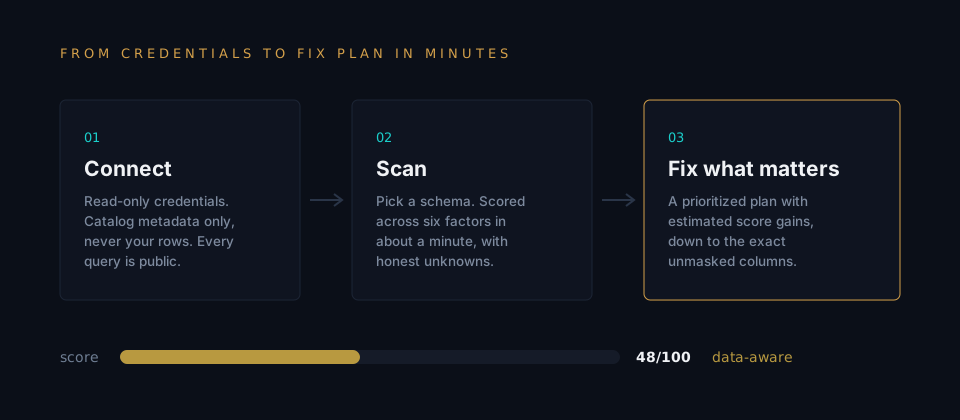
A MortarIQ scan connects to BigQuery with a dedicated service account holding exactly two project-level roles: BigQuery Metadata Viewer, which exposes structure, and BigQuery Job User, which permits running the metadata queries. Neither role can read table data. If you would rather not create a service account to try it, you can connect with Google OAuth in the browser and the scan runs as you, with the same metadata-only queries. Either way, the exact SQL each connector runs is published, so the security conversation is a verification, not a trust fall. The metadata-only method post explains the design in full.
Get your readiness score.
Connect read-only credentials and see your score and biggest blocker in minutes. Metadata only. Starts free.
Run the free scanWhat to expect in a BigQuery project
The recurring shape is a barbell. At one end, a well-governed core: the dbt-built marts, documented in YAML if not always in the catalog, fresh, conventionally named. At the other, a long tail of datasets nobody owns: one-off exports, abandoned experiments, a duplicate of production someone made for a migration and never deleted. The core would score well on its own. The tail drags the estate down, and the tail is where the unprotected personal data lives, because ad hoc exports are exactly the tables that skip governance.
For an AI project this matters more than it did for BI, because AI workloads get pointed at the estate, not the marts. A retrieval corpus assembled from “whatever looks relevant” will happily ingest the 2023 export with the unmasked emails. Knowing which datasets are in the tail, and what is in them, is the difference between scoping the corpus and discovering it.
The honest boundary
A metadata scan has a ceiling, on BigQuery as anywhere else: it cannot verify values. A description can be stale, a policy tag can be misapplied, and a scan that never reads rows cannot tell you otherwise; this one never reads rows by design. What the assessment gives you is the structural truth of the estate: what exists, what is documented, what is protected, what is fresh, and what your chosen workload requires that is missing. It prepares evidence. It does not certify anything, and if a tool claims a metadata scan certifies compliance, it is overclaiming. The score also decays as the estate changes, which is why monitoring exists.
Frequently asked questions
What access does an AI readiness scan need on BigQuery?
Two project-level IAM roles on a dedicated service account: BigQuery Metadata Viewer, which exposes dataset and table structure, and BigQuery Job User, which allows running the metadata queries themselves. Neither grants read access to table data. Alternatively, you can connect with Google OAuth in the browser and the scan runs with your own read scope.
Does the scan read any rows from my BigQuery tables?
No. The assessment queries INFORMATION_SCHEMA views and table metadata: schema structure, descriptions, types, last-modified times, partitioning and clustering configuration, labels, and policy tags. It never runs a SELECT against your tables, and every query each connector can run is published and generated from source.
How does BigQuery handle primary and foreign keys for readiness scoring?
BigQuery supports declared, unenforced primary and foreign key constraints. They are rarely declared, which costs real readiness: without declared keys, nothing in the catalog says what a row means or how tables join. The assessment reads declared constraints from metadata and scores the Correlated factor accordingly.
What does a readiness scan cost to run on BigQuery?
Effectively nothing. INFORMATION_SCHEMA queries scan metadata, not table storage, so the bytes-processed cost of an assessment is trivial even on very large estates. There is no full-table scan anywhere in the assessment.
Want to see the output first? Read a sample readiness report built entirely from metadata.